
- やさしい日本語
- ひらがなをつける
- Language
We provide multilingual content through machine translation. Translation accuracy is not 100%. About the multilingualization of the JAC website






- Home
-
View information on overseas job seekers
JAC Members
Update date: 2025/11/27
Release date: October 26, 2023
View information on overseas job seekers
You can view information about job seekers on the overseas job seeker information bulletin board. You can also send messages to job seekers that interest you.
To view job seeker information, the job posting must be "public."
For details, please see "Making overseas recruitment information public or private."
Make overseas recruitment information public or private
Message procedure with overseas job seekers
To view job seeker information on the message board, please follow the steps below.
Step 1.
Display the "Overseas Job Seekers Information Bulletin Board"
1-1. Display the "Overseas Job Seeker Information Board Menu" screen
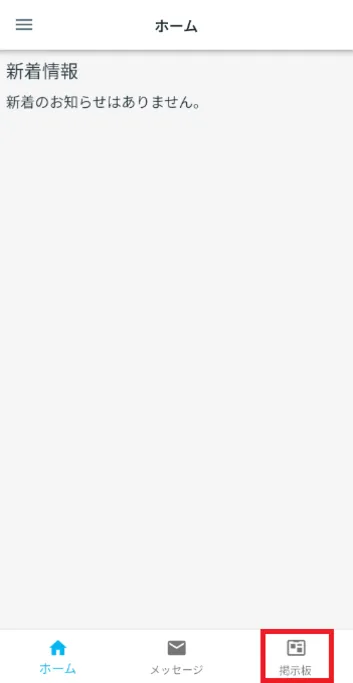
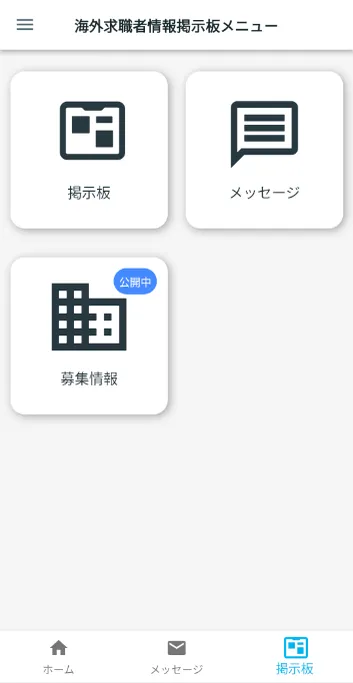
On the home screen of the JAC Members app, tap [Bulletin Board] on the bottom menu bar.
The "Overseas Job Seekers Information Board Menu" screen will be displayed.
1-2. Display the "Overseas Job Seekers Information Board"
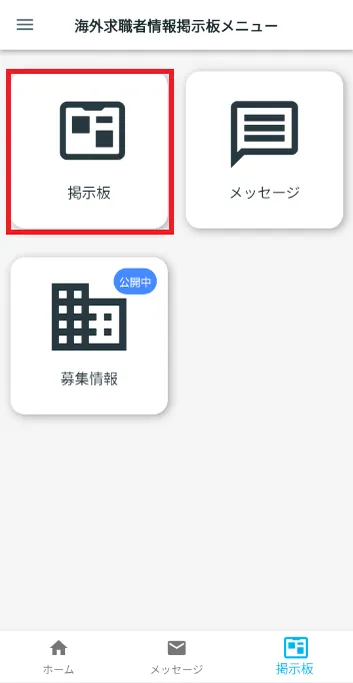
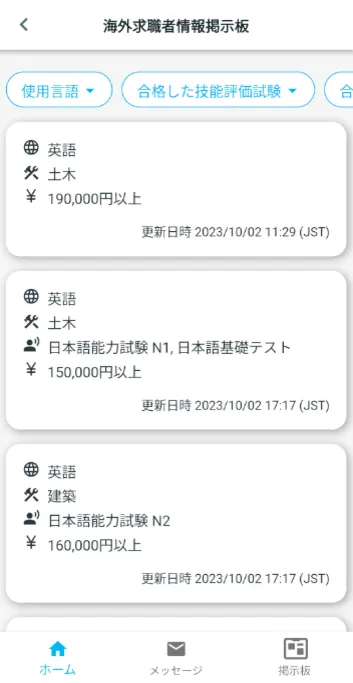
Tap [Bulletin Board] on the overseas job seeker information bulletin board menu.
The "Overseas Job Seekers Information Board" screen will be displayed.
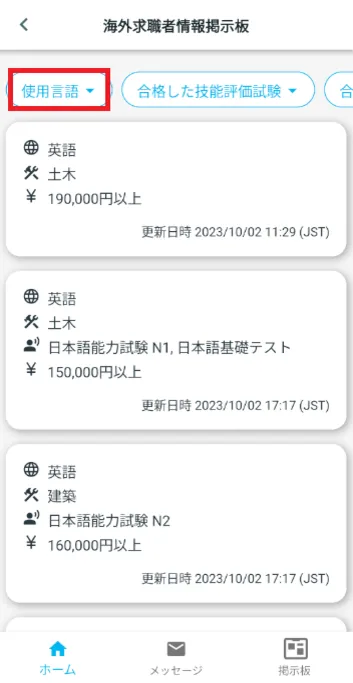
1-3. Specify the conditions of the job seekers you want to see
Job seeker information is usually listed in order of most recently updated date.
You can also specify conditions to narrow down the job seekers displayed.
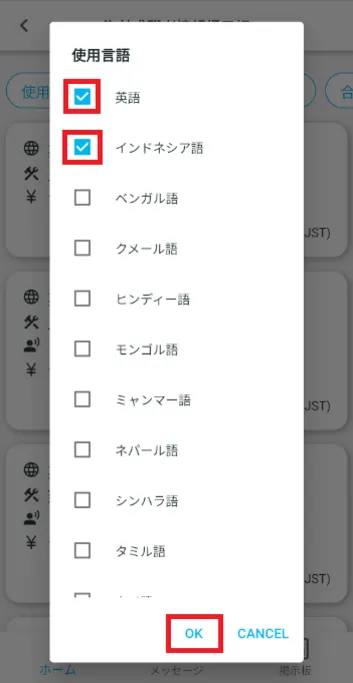
Example: Specifying conditions by language
① On the "Overseas Job Seekers Information Board", tap "Language used".
②Select a language and tap [OK].
(Multiple languages can be selected)
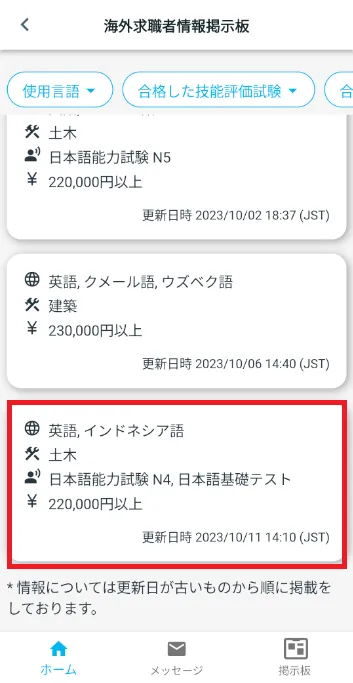
③Only job seekers who speak the selected language will be displayed.
<List of conditions that can be narrowed down (multiple conditions can also be used)>
- ・Language used
- ・Passed skills evaluation exam
- ・Passed Japanese language exam
- ・Desired monthly wage
<List of conditions that can be narrowed down (multiple conditions can also be used)>
- ・Language used
- ・Passed skills evaluation exam
- ・Passed Japanese language exam
- ・Desired monthly wage
Step 2.
View job candidate information
2-1. Display job applicant information
On the "Overseas Job Seeker Information Board" screen, tap the information on the job seeker you want to view.
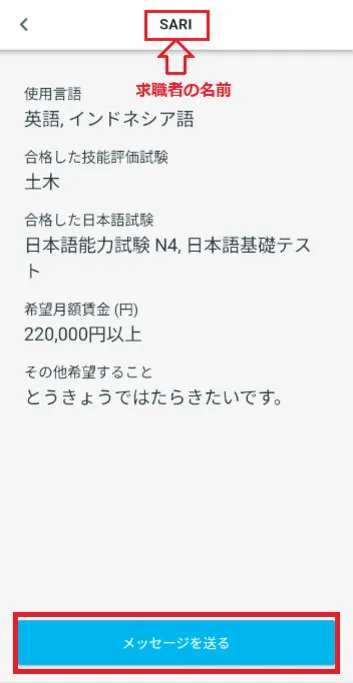
The details of the selected job candidate information will be displayed.
(The job seeker's name will appear in the header.)
You can also send a message to the job seeker by tapping [Send Message].
For more information, please see the link below.
Messages with overseas job seekers Step 2. Check and reply to messages
Frequently Asked Questions (FAQ)
- Where can I install the "JAC Members" app?
- I forgot the password I registered for the "JAC Members" app.
- I have a new smartphone. Can I still use the "JAC Members" app?
- Is there a way to send a message to JAC using the "JAC Members" app?
- I would like to use my residence card to "apply for a change of device." What should I do?
- How do I delete my account?
- A "Supported Version Change Notification" dialog box appears on the app screen. What should I do?
- What should I do if I don't know where the files I downloaded using the "JAC Members" app are saved?
- What should I do if I don't know where the files I downloaded from "My Page" are saved?
- What should I do if I am unable to submit an application and a dialog box appears stating "You cannot submit a new application because you have already applied for the following."?
Index
- For Japanese construction companies
- For foreigners living in Japan
- For foreigners living abroad
For Japanese construction companies
Account registration and basic operations
Use of overseas recruitment information bulletin board
* Applications for issuance of pass certificate The Specified Skills Evaluation Exam or for events (seminars, Japanese courses, etc.) are only open to foreigners.
For foreigners living in Japan
Account registration and basic operations
For foreigners living abroad
Account registration and basic operations
Find Japanese companies (overseas recruitment information bulletin board)

- 0120-220353Weekdays: 9:00-17:30 Saturdays, Sundays, and holidays: Closed
- Q&A
- Contact Us